> ## Documentation Index
> Fetch the complete documentation index at: https://langchain-5e9cc07a-preview-javaex-1765204202-a1f8093.mintlify.site/llms.txt
> Use this file to discover all available pages before exploring further.
# Tracing quickstart
[*Observability*](/langsmith/observability-concepts) is a critical requirement for applications built with Large Language Models (LLMs). LLMs are non-deterministic, which means that the same prompt can produce different responses. This behavior makes debugging and monitoring more challenging than with traditional software.
LangSmith addresses this by providing end-to-end visibility into how your application handles a request. Each request generates a [*trace*](/langsmith/observability-concepts#traces), which captures the full record of what happened. Within a trace are individual [*runs*](/langsmith/observability-concepts#runs), the specific operations your application performed, such as an LLM call or a retrieval step. Tracing runs allows you to inspect, debug, and validate your application’s behavior.
In this quickstart, you will set up a minimal [*Retrieval Augmented Generation (RAG)*](https://www.mckinsey.com/featured-insights/mckinsey-explainers/what-is-retrieval-augmented-generation-rag) application and add tracing with LangSmith. You will:
1. Configure your environment.
2. Create an application that retrieves context and calls an LLM.
3. Enable tracing to capture both the retrieval step and the LLM call.
4. View the resulting traces in the LangSmith UI.
If you prefer to watch a video on getting started with tracing, refer to the quickstart [Video guide](#video-guide).
## Prerequisites
Before you begin, make sure you have:
* **A LangSmith account**: Sign up or log in at [smith.langchain.com](https://smith.langchain.com).
* **A LangSmith API key**: Follow the [Create an API key](/langsmith/create-account-api-key#create-an-api-key) guide.
* **An OpenAI API key**: Generate this from the [OpenAI dashboard](https://platform.openai.com/account/api-keys).
The example app in this quickstart will use OpenAI as the LLM provider. You can adapt the example for your app's LLM provider.
If you're building an application with [LangChain](https://python.langchain.com/docs/introduction/) or [LangGraph](https://langchain-ai.github.io/langgraph/), you can enable LangSmith tracing with a single environment variable. Get started by reading the guides for tracing with [LangChain](/langsmith/trace-with-langchain) or tracing with [LangGraph](/langsmith/trace-with-langgraph).
## 1. Create a directory and install dependencies
In your terminal, create a directory for your project and install the dependencies in your environment:
```bash Python theme={null}
mkdir ls-observability-quickstart && cd ls-observability-quickstart
python -m venv .venv && source .venv/bin/activate
python -m pip install --upgrade pip
pip install -U langsmith openai
```
```bash TypeScript theme={null}
mkdir ls-observability-quickstart-ts && cd ls-observability-quickstart-ts
npm init -y
npm install langsmith openai typescript ts-node
npx tsc --init
```
```bash Maven theme={null}
# Create a new Maven project
mkdir ls-observability-quickstart-java && cd ls-observability-quickstart-java
mvn archetype:generate -DgroupId=com.example -DartifactId=langsmith-quickstart \
-DarchetypeArtifactId=maven-archetype-quickstart -DinteractiveMode=false
cd langsmith-quickstart
# Then add these dependencies to your pom.xml section:
com.langchain.smithlangsmith-java0.1.0-alpha.17com.openaiopenai-java0.20.2io.opentelemetryopentelemetry-sdk1.34.1
```
```bash Gradle theme={null}
# Create a new Gradle project
mkdir ls-observability-quickstart-java && cd ls-observability-quickstart-java
gradle init --type java-application --dsl kotlin
# Then add these dependencies to your build.gradle.kts:
dependencies {
implementation("com.langchain.smith:langsmith-java:0.1.0-alpha.17")
implementation("com.openai:openai-java:0.20.2")
implementation("io.opentelemetry:opentelemetry-sdk:1.34.1")
}
```
## 2. Set up environment variables
Set the following environment variables:
* `LANGSMITH_TRACING`
* `LANGSMITH_API_KEY`
* `OPENAI_API_KEY` (or your LLM provider's API key)
* (optional) `LANGSMITH_WORKSPACE_ID`: If your LangSmith API key is linked to multiple workspaces, set this variable to specify which workspace to use.
```bash theme={null}
export LANGSMITH_TRACING=true
export LANGSMITH_API_KEY=""
export OPENAI_API_KEY=""
export LANGSMITH_WORKSPACE_ID=""
```
If you're using Anthropic, use the [Anthropic wrapper](/langsmith/annotate-code#wrap-the-anthropic-client-python-only) to trace your calls. For other providers, use [the traceable wrapper](/langsmith/annotate-code#use-%40traceable-%2F-traceable).
## 3. Define your application
You can use the example app code outlined in this step to instrument a RAG application. Or, you can use your own application code that includes an LLM call.
This is a minimal RAG app that uses the OpenAI SDK directly without any LangSmith tracing added yet. It has three main parts:
* **Retriever function**: Simulates document retrieval that always returns the same string.
* **OpenAI client**: Instantiates a plain OpenAI client to send a chat completion request.
* **RAG function**: Combines the retrieved documents with the user’s question to form a system prompt, calls the `chat.completions.create()` endpoint with `gpt-4o-mini`, and returns the assistant’s response.
Add the following code into your app file (e.g., `app.py` or `app.ts`):
```python Python theme={null}
from openai import OpenAI
def retriever(query: str):
# Minimal example retriever
return ["Harrison worked at Kensho"]
# OpenAI client call (no wrapping yet)
client = OpenAI()
def rag(question: str) -> str:
docs = retriever(question)
system_message = (
"Answer the user's question using only the provided information below:\n"
+ "\n".join(docs)
)
# This call is not traced yet
resp = client.chat.completions.create(
model="gpt-4o-mini",
messages=[
{"role": "system", "content": system_message},
{"role": "user", "content": question},
],
)
return resp.choices[0].message.content
if __name__ == "__main__":
print(rag("Where did Harrison work?"))
```
```typescript TypeScript theme={null}
import "dotenv/config";
import OpenAI from "openai";
// Minimal example retriever
function retriever(query: string): string[] {
return ["Harrison worked at Kensho"];
}
// OpenAI client call (no wrapping yet)
const client = new OpenAI();
async function rag(question: string) {
const docs = retriever(question);
const systemMessage =
"Answer the user's question using only the provided information below:\n" +
docs.join("\n");
// This call is not traced yet
const resp = await client.chat.completions.create({
model: "gpt-4o-mini",
messages: [
{ role: "system", content: systemMessage },
{ role: "user", content: question },
],
});
return resp.choices[0].message?.content;
}
(async () => {
console.log(await rag("Where did Harrison work?"));
})();
```
```java Java theme={null}
import com.openai.client.OpenAIClient;
import com.openai.client.okhttp.OpenAIOkHttpClient;
import com.openai.models.ChatModel;
import com.openai.models.chat.completions.ChatCompletion;
import com.openai.models.chat.completions.ChatCompletionCreateParams;
import java.util.Arrays;
import java.util.List;
public class RagApp {
// Minimal example retriever
public static List retriever(String query) {
return Arrays.asList("Harrison worked at Kensho");
}
// OpenAI client call (no wrapping yet)
static OpenAIClient client = OpenAIOkHttpClient.fromEnv();
public static String rag(String question) {
List docs = retriever(question);
String systemMessage =
"Answer the user's question using only the provided information below:\n" +
String.join("\n", docs);
// This call is not traced yet
ChatCompletionCreateParams params = ChatCompletionCreateParams.builder()
.model(ChatModel.GPT_4O_MINI)
.addSystemMessage(systemMessage)
.addUserMessage(question)
.build();
ChatCompletion resp = client.chat().completions().create(params);
return resp.choices().get(0).message().content().orElse("");
}
public static void main(String[] args) {
System.out.println(rag("Where did Harrison work?"));
}
}
```
## 4. Trace LLM calls
To start, you'll trace all your OpenAI calls. LangSmith provides wrappers:
* Python: [`wrap_openai`](https://docs.smith.langchain.com/reference/python/wrappers/langsmith.wrappers._openai.wrap_openai)
* TypeScript: [`wrapOpenAI`](https://docs.smith.langchain.com/reference/js/functions/wrappers_openai.wrapOpenAI)
* Java: [`WrappedOpenAIClient`](https://javadoc.io/doc/com.langchain.smith/langsmith-java/latest/com/langchain/smith/wrappers/openai/WrappedOpenAIClient.html)
This snippet wraps the OpenAI client so that every subsequent model call is logged automatically as a traced child run in LangSmith.
1. Include the highlighted lines in your app file:
```python Python highlight={2,7} theme={null}
from openai import OpenAI
from langsmith.wrappers import wrap_openai # traces openai calls
def retriever(query: str):
return ["Harrison worked at Kensho"]
client = wrap_openai(OpenAI()) # log traces by wrapping the model calls
def rag(question: str) -> str:
docs = retriever(question)
system_message = (
"Answer the user's question using only the provided information below:\n"
+ "\n".join(docs)
)
resp = client.chat.completions.create(
model="gpt-4o-mini",
messages=[
{"role": "system", "content": system_message},
{"role": "user", "content": question},
],
)
return resp.choices[0].message.content
if __name__ == "__main__":
print(rag("Where did Harrison work?"))
```
```typescript TypeScript highlight={3,9} theme={null}
import "dotenv/config";
import OpenAI from "openai";
import { wrapOpenAI } from "langsmith/wrappers"; // traces openai calls
function retriever(query: string): string[] {
return ["Harrison worked at Kensho"];
}
const client = wrapOpenAI(new OpenAI()); // log traces by wrapping the model calls
async function rag(question: string) {
const docs = retriever(question);
const systemMessage =
"Answer the user's question using only the provided information below:\n" +
docs.join("\n");
const resp = await client.chat.completions.create({
model: "gpt-4o-mini",
messages: [
{ role: "system", content: systemMessage },
{ role: "user", content: question },
],
});
return resp.choices[0].message?.content;
}
(async () => {
console.log(await rag("Where did Harrison work?"));
})();
```
```java Java highlight={2,3,8,10} theme={null}
import com.langchain.smith.wrappers.openai.OpenTelemetryConfig;
import com.langchain.smith.wrappers.openai.WrappedOpenAIClient;
import com.openai.models.ChatModel;
import com.openai.models.chat.completions.ChatCompletion;
import com.openai.models.chat.completions.ChatCompletionCreateParams;
import java.util.Arrays;
import java.util.List;
public class RagApp {
public static List retriever(String query) {
return Arrays.asList("Harrison worked at Kensho");
}
// Configure OpenTelemetry for LangSmith
static {
OpenTelemetryConfig.builder()
.fromEnv() // reads LANGSMITH_API_KEY and LANGSMITH_PROJECT
.build();
}
// Wrap OpenAI client to automatically trace calls
static WrappedOpenAIClient client = WrappedOpenAIClient.fromEnv();
public static String rag(String question) {
List docs = retriever(question);
String systemMessage =
"Answer the user's question using only the provided information below:\n" +
String.join("\n", docs);
ChatCompletionCreateParams params = ChatCompletionCreateParams.builder()
.model(ChatModel.GPT_4O_MINI)
.addSystemMessage(systemMessage)
.addUserMessage(question)
.build();
ChatCompletion resp = client.chat().completions().create(params);
return resp.choices().get(0).message().content().orElse("");
}
public static void main(String[] args) {
System.out.println(rag("Where did Harrison work?"));
// Flush traces to ensure they're sent to LangSmith
OpenTelemetryConfig.flush(5, java.util.concurrent.TimeUnit.SECONDS);
}
}
```
2. Call your application:
```bash Python theme={null}
python app.py
```
```bash TypeScript theme={null}
npx ts-node app.ts
```
```bash Java theme={null}
# Using Maven
mvn compile exec:java -Dexec.mainClass="RagApp"
# Or using Gradle
./gradlew run
```
You'll receive the following output:
```
Harrison worked at Kensho.
```
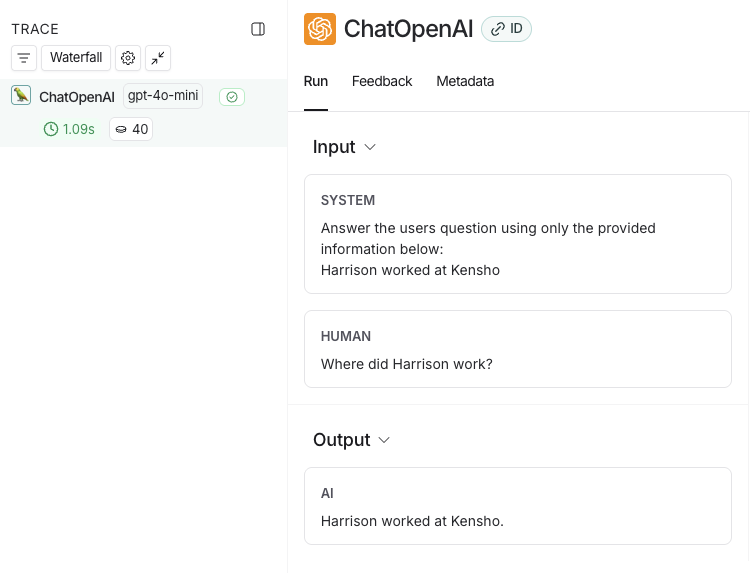
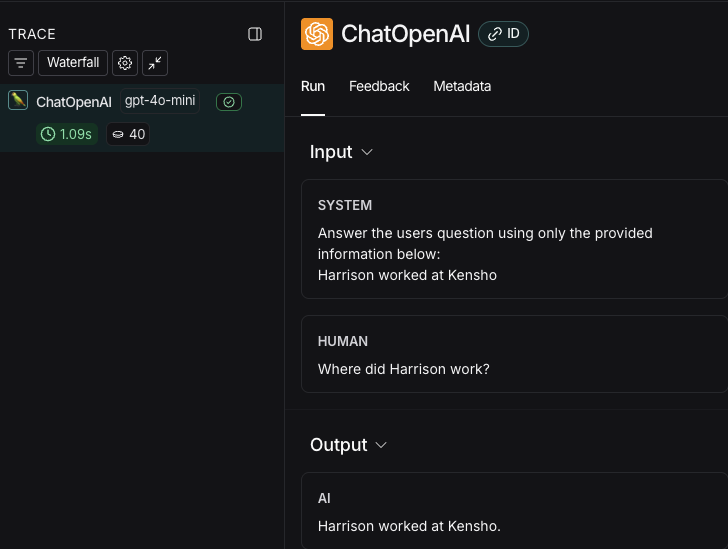
3. In the [LangSmith UI](https://smith.langchain.com), navigate to the **default** Tracing Project for your workspace (or the workspace you specified in [Step 2](#2-set-up-environment-variables)). You'll see the OpenAI call you just instrumented.
## 5. Trace an entire application
You can also use the `traceable` decorator for [Python](https://docs.smith.langchain.com/reference/python/run_helpers/langsmith.run_helpers.traceable) or [TypeScript](https://langsmith-docs-bdk0fivr6-langchain.vercel.app/reference/js/functions/traceable.traceable) to trace your entire application instead of just the LLM calls. In Java, you can use [OpenTelemetry spans](https://opentelemetry.io/docs/instrumentation/java/manual/) to create custom traces.
1. Include the highlighted code in your app file:
```python Python highlight={3,10} theme={null}
from openai import OpenAI
from langsmith.wrappers import wrap_openai
from langsmith import traceable
def retriever(query: str):
return ["Harrison worked at Kensho"]
client = wrap_openai(OpenAI()) # keep this to capture the prompt and response from the LLM
@traceable
def rag(question: str) -> str:
docs = retriever(question)
system_message = (
"Answer the user's question using only the provided information below:\n"
+ "\n".join(docs)
)
resp = client.chat.completions.create(
model="gpt-4o-mini",
messages=[
{"role": "system", "content": system_message},
{"role": "user", "content": question},
],
)
return resp.choices[0].message.content
if __name__ == "__main__":
print(rag("Where did Harrison work?"))
```
```typescript TypeScript highlight={3,11} theme={null}
import "dotenv/config";
import OpenAI from "openai";
import { wrapOpenAI, traceable } from "langsmith/wrappers";
function retriever(query: string): string[] {
return ["Harrison worked at Kensho"];
}
const client = wrapOpenAI(new OpenAI()); // keep this to capture the prompt and response from the LLM
const rag = traceable(async (question: string) => {
const docs = retriever(question);
const systemMessage =
"Answer the user's question using only the provided information below:\n" +
docs.join("\n");
const resp = await client.chat.completions.create({
model: "gpt-4o-mini",
messages: [
{ role: "system", content: systemMessage },
{ role: "user", content: question },
],
});
return resp.choices[0].message?.content;
});
(async () => {
console.log(await rag("Where did Harrison work?"));
})();
```
```java Java highlight={3,4,5,14,20-24,33-38} theme={null}
import com.langchain.smith.wrappers.openai.OpenTelemetryConfig;
import com.langchain.smith.wrappers.openai.WrappedOpenAIClient;
import io.opentelemetry.api.GlobalOpenTelemetry;
import io.opentelemetry.api.trace.Span;
import io.opentelemetry.api.trace.Tracer;
import io.opentelemetry.context.Scope;
import com.openai.models.ChatModel;
import com.openai.models.chat.completions.ChatCompletion;
import com.openai.models.chat.completions.ChatCompletionCreateParams;
import java.util.Arrays;
import java.util.List;
public class RagApp {
static Tracer tracer;
public static List retriever(String query) {
return Arrays.asList("Harrison worked at Kensho");
}
static {
OpenTelemetryConfig.builder()
.fromEnv()
.build();
tracer = GlobalOpenTelemetry.get().getTracer("rag-app");
}
static WrappedOpenAIClient client = WrappedOpenAIClient.fromEnv();
public static String rag(String question) {
// Create a span to trace the entire RAG pipeline
Span ragSpan = tracer.spanBuilder("rag")
.setAttribute("question", question)
.startSpan();
try (Scope scope = ragSpan.makeCurrent()) {
List docs = retriever(question);
String systemMessage =
"Answer the user's question using only the provided information below:\n" +
String.join("\n", docs);
ChatCompletionCreateParams params = ChatCompletionCreateParams.builder()
.model(ChatModel.GPT_4O_MINI)
.addSystemMessage(systemMessage)
.addUserMessage(question)
.build();
ChatCompletion resp = client.chat().completions().create(params);
String answer = resp.choices().get(0).message().content().orElse("");
ragSpan.setAttribute("answer", answer);
return answer;
} finally {
ragSpan.end();
}
}
public static void main(String[] args) {
System.out.println(rag("Where did Harrison work?"));
OpenTelemetryConfig.flush(5, java.util.concurrent.TimeUnit.SECONDS);
}
}
```
2. Call the application again to create a run:
```bash Python theme={null}
python app.py
```
```bash TypeScript theme={null}
npx ts-node app.ts
```
```bash Java theme={null}
# Using Maven
mvn compile exec:java -Dexec.mainClass="RagApp"
# Or using Gradle
./gradlew run
```
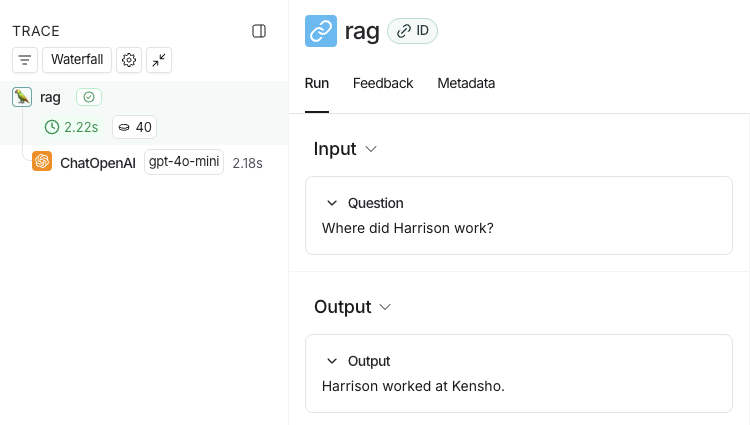
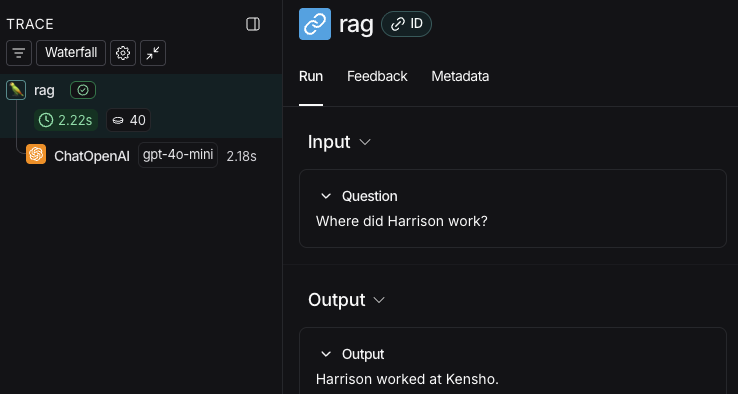
3. Return to the [LangSmith UI](https://smith.langchain.com), navigate to the **default** Tracing Project for your workspace (or the workspace you specified in [Step 2](#2-set-up-environment-variables)). You'll find a trace of the entire app pipeline with the **rag** step and the **ChatOpenAI** LLM call.
## Next steps
Here are some topics you might want to explore next:
* [Tracing integrations](/langsmith/trace-with-langchain) provide support for various LLM providers and agent frameworks.
* [Filtering traces](/langsmith/filter-traces-in-application) can help you effectively navigate and analyze data in tracing projects that contain a significant amount of data.
* [Trace a RAG application](/langsmith/observability-llm-tutorial) is a full tutorial, which adds observability to an application from development through to production.
* [Sending traces to a specific project](/langsmith/log-traces-to-project) changes the destination project of your traces.
## Video guide
***
[Edit the source of this page on GitHub.](https://github.com/langchain-ai/docs/edit/main/src/langsmith/observability-quickstart.mdx)
[Connect these docs programmatically](/use-these-docs) to Claude, VSCode, and more via MCP for real-time answers.