> ## Documentation Index
> Fetch the complete documentation index at: https://langchain-5e9cc07a-preview-javaex-1765204202-a1f8093.mintlify.site/llms.txt
> Use this file to discover all available pages before exploring further.
# Log LLM calls
This guide will cover how to log LLM calls to LangSmith when you are using a custom model or a custom input/output format. To make the most of LangSmith's LLM trace processing, you should log your LLM traces in one of the specified formats.
LangSmith offers the following benefits for LLM traces:
* Rich, structured rendering of message lists
* Token and cost tracking per LLM call, per trace and across traces over time
If you don't log your LLM traces in the suggested formats, you will still be able to log the data to LangSmith, but it may not be processed or rendered in expected ways.
If you are using [LangChain OSS](https://python.langchain.com/docs/tutorials/llm_chain/) to call language models or LangSmith wrappers ([OpenAI](/langsmith/trace-openai), [Anthropic](/langsmith/trace-anthropic)), these approaches will automatically log traces in the correct format.
The examples on this page use the `traceable` decorator/wrapper to log the model run (which is the recommended approach for Python and JS/TS). However, the same idea applies if you are using the [RunTree](/langsmith/annotate-code#use-the-runtree-api) or [API](https://api.smith.langchain.com/redoc) directly.
## Messages Format
When tracing a custom model or a custom input/output format, it must either follow the LangChain format, OpenAI completions format or Anthropic messages format. For more details, refer to the [OpenAI Chat Completions](https://platform.openai.com/docs/api-reference/chat/create) or [Anthropic Messages](https://platform.claude.com/docs/en/api/messages) documentation. The LangChain format is:
A list of messages containing the content of the conversation.
Identifies the message type. One of: system | reasoning | user | assistant | tool
Content of the message. List of typed dictionaries.
One of: text | image | file | audio | video | tool\_call | server\_tool\_call | server\_tool\_result.
Text content.
List of annotations for the text
Additional provider-specific data.
Text content.
Additional provider-specific data.
URL pointing to the image location.
Base64-encoded image data.
Reference ID to an externally stored image (e.g., in a provider’s file system or in a bucket).
Image [MIME type](https://www.iana.org/assignments/media-types/media-types.xhtml#image) (e.g., `image/jpeg`, `image/png`).
URL pointing to the file.
Base64-encoded file data.
Reference ID to an externally stored file (e.g., in a provider’s file system or in a bucket).
File [MIME type](https://www.iana.org/assignments/media-types/media-types.xhtml#image) (e.g., `application/pdf`).
URL pointing to the audio file.
Base64-encoded audio data.
Reference ID to an externally stored audio file (e.g., in a provider’s file system or in a bucket).
Audio [MIME type](https://www.iana.org/assignments/media-types/media-types.xhtml#image) (e.g., `audio/mpeg`, `audio/wav`).
URL pointing to the video file.
Base64-encoded video data.
Reference ID to an externally stored video file (e.g., in a provider’s file system or in a bucket).
Video [MIME type](https://www.iana.org/assignments/media-types/media-types.xhtml#image) (e.g., `video/mp4`, `video/webm`).
Arguments to pass to the tool.
Unique identifier for this tool call.
Unique identifier for this tool call.
The name of the tool to be called.
Arguments to pass to the tool.
Identifier of the corresponding server tool call.
Unique identifier for this tool call.
Execution status of the server-side tool. One of: success | error.
Output of the executed tool.
Must match the id of a prior assistant message’s tool\_calls\[i] entry. Only valid when role is tool.
Use this field to send token counts and/or costs with your model's output. See [this guide](/langsmith/log-llm-trace#provide-token-and-cost-information) for more details.
### Examples
```python Text and reasoning theme={null}
inputs = {
"messages": [
{
"role": "user",
"content": [
{
"type": "text",
"text": "Hi, can you tell me the capital of France?"
}
]
}
]
}
outputs = {
"messages": [
{
"role": "assistant",
"content": [
{
"type": "text",
"text": "The capital of France is Paris."
},
{
"type": "reasoning",
"text": "The user is asking about..."
}
]
}
]
}
```
```python Tool calls theme={null}
input = {
"messages": [
{
"role": "user",
"content": [
{
"type": "text",
"text": "What's the weather in San Francisco?"
}
]
}
]
}
outputs = {
"messages": [
{
"role": "assistant",
"content": [{"type": "tool_call", "name": "get_weather", "args": {"city": "San Francisco"}, "id": "call_1"}],
},
{
"role": "tool",
"tool_call_id": "call_1",
"content": [
{
"type": "text",
"text": "{\"temperature\": \"18°C\", \"condition\": \"Sunny\"}"
}
]
},
{
"role": "assistant",
"content": [
{
"type": "text",
"text": "The weather in San Francisco is 18°C and sunny."
}
]
}
]
}
```
```python Multimodal theme={null}
inputs = {
"messages": [
{
"role": "user",
"content": [
{
"type": "text",
"text": "What breed is this dog?"
},
{
"type": "image",
"url": "https://fastly.picsum.photos/id/237/200/300.jpg?hmac=TmmQSbShHz9CdQm0NkEjx1Dyh_Y984R9LpNrpvH2D_U",
# alternative to a url, you can provide a base64 encoded image
# "base64": "",
"mime_type": "image/jpeg",
}
]
}
]
}
outputs = {
"messages": [
{
"role": "assistant",
"content": [
{
"type": "text",
"text": "This looks like a Black Labrador."
}
]
}
]
}
```
```python Server-side tool calls theme={null}
input = {
"messages": [
{
"role": "user",
"content": [
{
"type": "text",
"text": "What is the price of AAPL?"
}
]
}
]
}
output = {
"messages": [
{
"role": "assistant",
"content": [
{
"type": "server_tool_call",
"name": "web_search",
"args": {
"query": "price of AAPL",
"type": "search"
},
"id": "call_1"
},
{
"type": "server_tool_result",
"tool_call_id": "call_1",
"status": "success"
},
{
"type": "text",
"text": "The price of AAPL is $150.00"
}
]
}
]
}
```
## Converting custom I/O formats into LangSmith compatible formats
If you're using a custom input or output format, you can convert it to a LangSmith compatible format using `process_inputs`/`processInputs` and `process_outputs`/`processOutputs` functions on the [`@traceable` decorator](https://docs.smith.langchain.com/reference/python/run_helpers/langsmith.run_helpers.traceable) (Python) or [`traceable` function](https://docs.smith.langchain.com/reference/js/functions/traceable.traceable) (TS).
`process_inputs`/`processInputs` and `process_outputs`/`processOutputs` accept functions that allow you to transform the inputs and outputs of a specific trace before they are logged to LangSmith. They have access to the trace's inputs and outputs, and can return a new dictionary with the processed data.
Here's a boilerplate example of how to use `process_inputs` and `process_outputs` to convert a custom I/O format into a LangSmith compatible format:
```python Python theme={null}
class OriginalInputs(BaseModel):
"""Your app's custom request shape"""
class OriginalOutputs(BaseModel):
"""Your app's custom response shape."""
class LangSmithInputs(BaseModel):
"""The input format LangSmith expects."""
class LangSmithOutputs(BaseModel):
"""The output format LangSmith expects."""
def process_inputs(inputs: dict) -> dict:
"""Dict -> OriginalInputs -> LangSmithInputs -> dict"""
def process_outputs(output: Any) -> dict:
"""OriginalOutputs -> LangSmithOutputs -> dict"""
@traceable(run_type="llm", process_inputs=process_inputs, process_outputs=process_outputs)
def chat_model(inputs: dict) -> dict:
"""
Your app's model call. Keeps your custom I/O shape.
The decorators call process_* to log LangSmith-compatible format.
"""
```
## Identifying a custom model in traces
When using a custom model, it is recommended to also provide the following `metadata` fields to identify the model when viewing traces and when filtering.
* `ls_provider`: The provider of the model, eg "openai", "anthropic", etc.
* `ls_model_name`: The name of the model, eg "gpt-4o-mini", "claude-3-opus-20240229", etc.
```python Python theme={null}
from langsmith import traceable
inputs = [
{"role": "system", "content": "You are a helpful assistant."},
{"role": "user", "content": "I'd like to book a table for two."},
]
output = {
"choices": [
{
"message": {
"role": "assistant",
"content": "Sure, what time would you like to book the table for?"
}
}
]
}
@traceable(
run_type="llm",
metadata={"ls_provider": "my_provider", "ls_model_name": "my_model"}
)
def chat_model(messages: list):
return output
chat_model(inputs)
```
```typescript TypeScript theme={null}
import { traceable } from "langsmith/traceable";
const messages = [
{ role: "system", content: "You are a helpful assistant." },
{ role: "user", content: "I'd like to book a table for two." }
];
const output = {
choices: [
{
message: {
role: "assistant",
content: "Sure, what time would you like to book the table for?",
},
},
],
usage_metadata: {
input_tokens: 27,
output_tokens: 13,
total_tokens: 40,
},
};
// Can also use one of:
// const output = {
// message: {
// role: "assistant",
// content: "Sure, what time would you like to book the table for?"
// }
// };
//
// const output = {
// role: "assistant",
// content: "Sure, what time would you like to book the table for?"
// };
//
// const output = ["assistant", "Sure, what time would you like to book the table for?"];
const chatModel = traceable(
async ({ messages }: { messages: { role: string; content: string }[] }) => {
return output;
},
{
run_type: "llm",
name: "chat_model",
metadata: {
ls_provider: "my_provider",
ls_model_name: "my_model"
}
}
);
await chatModel({ messages });
```
This code will log the following trace:
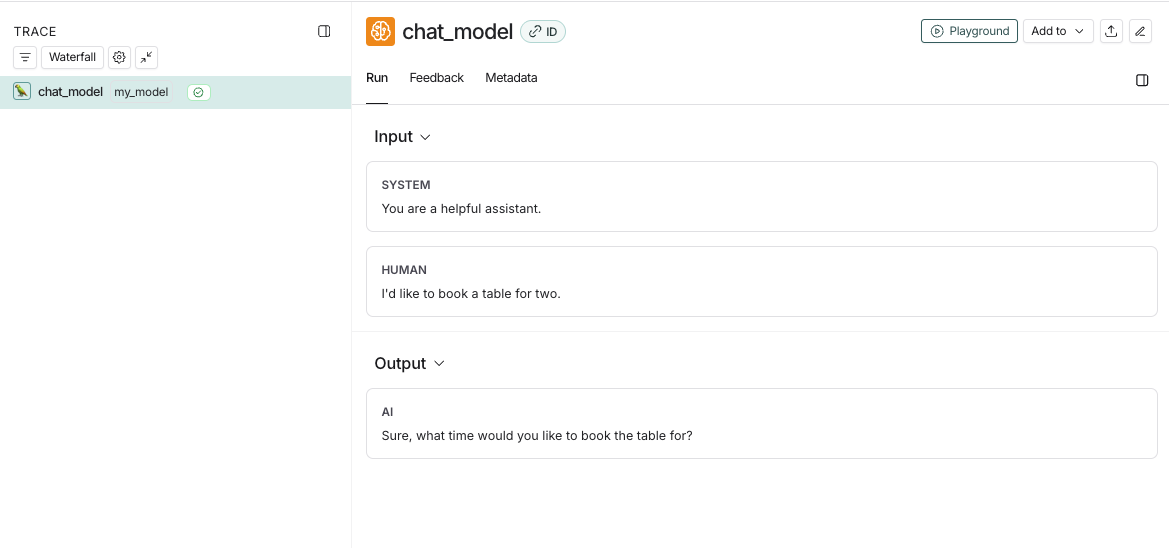
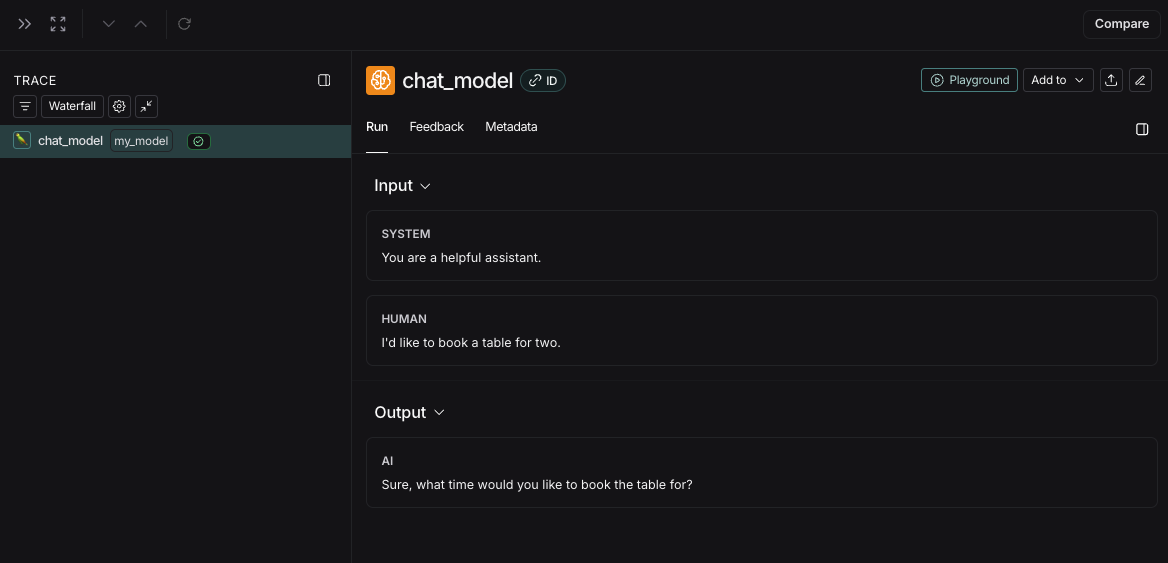
If you implement a custom streaming chat\_model, you can "reduce" the outputs into the same format as the non-streaming version. This is currently only supported in Python.
```python theme={null}
def _reduce_chunks(chunks: list):
all_text = "".join([chunk["choices"][0]["message"]["content"] for chunk in chunks])
return {"choices": [{"message": {"content": all_text, "role": "assistant"}}]}
@traceable(
run_type="llm",
reduce_fn=_reduce_chunks,
metadata={"ls_provider": "my_provider", "ls_model_name": "my_model"}
)
def my_streaming_chat_model(messages: list):
for chunk in ["Hello, " + messages[1]["content"]]:
yield {
"choices": [
{
"message": {
"content": chunk,
"role": "assistant",
}
}
]
}
list(
my_streaming_chat_model(
[
{"role": "system", "content": "You are a helpful assistant. Please greet the user."},
{"role": "user", "content": "polly the parrot"},
],
)
)
```
If `ls_model_name` is not present in `extra.metadata`, other fields might be used from the `extra.metadata` for estimating token counts. The following fields are used in the order of precedence:
1. `metadata.ls_model_name`
2. `inputs.model`
3. `inputs.model_name`
To learn more about how to use the `metadata` fields, refer to the [Add metadata and tags](/langsmith/add-metadata-tags) guide.
## Provide token and cost information
LangSmith calculates costs derived from token counts and model prices automatically. Learn about [how to provide tokens and/or costs in a run](/langsmith/cost-tracking#cost-tracking) and [viewing costs in the LangSmith UI](/langsmith/cost-tracking#viewing-costs-in-the-langsmith-ui).
## Time-to-first-token
If you are using `traceable` or one of our SDK wrappers, LangSmith will automatically populate time-to-first-token for streaming LLM runs.
However, if you are using the `RunTree` API directly, you will need to add a `new_token` event to the run tree in order to properly populate time-to-first-token.
Here's an example:
```python Python theme={null}
from langsmith.run_trees import RunTree
run_tree = RunTree(
name="CustomChatModel",
run_type="llm",
inputs={ ... }
)
run_tree.post()
llm_stream = ...
first_token = None
for token in llm_stream:
if first_token is None:
first_token = token
run_tree.add_event({
"name": "new_token"
})
run_tree.end(outputs={ ... })
run_tree.patch()
```
```typescript TypeScript theme={null}
import { RunTree } from "langsmith";
const runTree = new RunTree({
name: "CustomChatModel",
run_type: "llm",
inputs: { ... },
});
await runTree.postRun();
const llmStream = ...;
let firstToken;
for (const token of llmStream) {
if (firstToken == null) {
firstToken = token;
runTree.addEvent({ name: "new_token" });
}
}
await runTree.end({
outputs: { ... },
});
await runTree.patchRun();
```
***
[Edit the source of this page on GitHub.](https://github.com/langchain-ai/docs/edit/main/src/langsmith/log-llm-trace.mdx)
[Connect these docs programmatically](/use-these-docs) to Claude, VSCode, and more via MCP for real-time answers.