> ## Documentation Index
> Fetch the complete documentation index at: https://langchain-5e9cc07a-preview-javaex-1765204202-a1f8093.mintlify.site/llms.txt
> Use this file to discover all available pages before exploring further.
# Dynamic few shot example selection
This feature is in open beta. It is only available to paid team plans. Please contact support via [support.langchain.com](https://support.langchain.com) if you have questions about enablement.
Configure your datasets so that you can search for few shot examples based on an incoming request.
## Pre-conditions
1. Your dataset must use the KV store data type (we do not currently support chat model or LLM type datasets)
2. You must have an input schema defined for your dataset. See our docs on setting up schema validation [in our UI](/langsmith/manage-datasets-in-application#dataset-schema-validation) for details.
3. You must be on a paid team plan (e.g. Plus plan)
4. You must be on LangSmith cloud
## Index your dataset for few shot search
Navigate to the datasets UI, and click the new `Few-Shot search` tab. Hit the `Start sync` button, which will create a new index on your dataset to make it searchable.
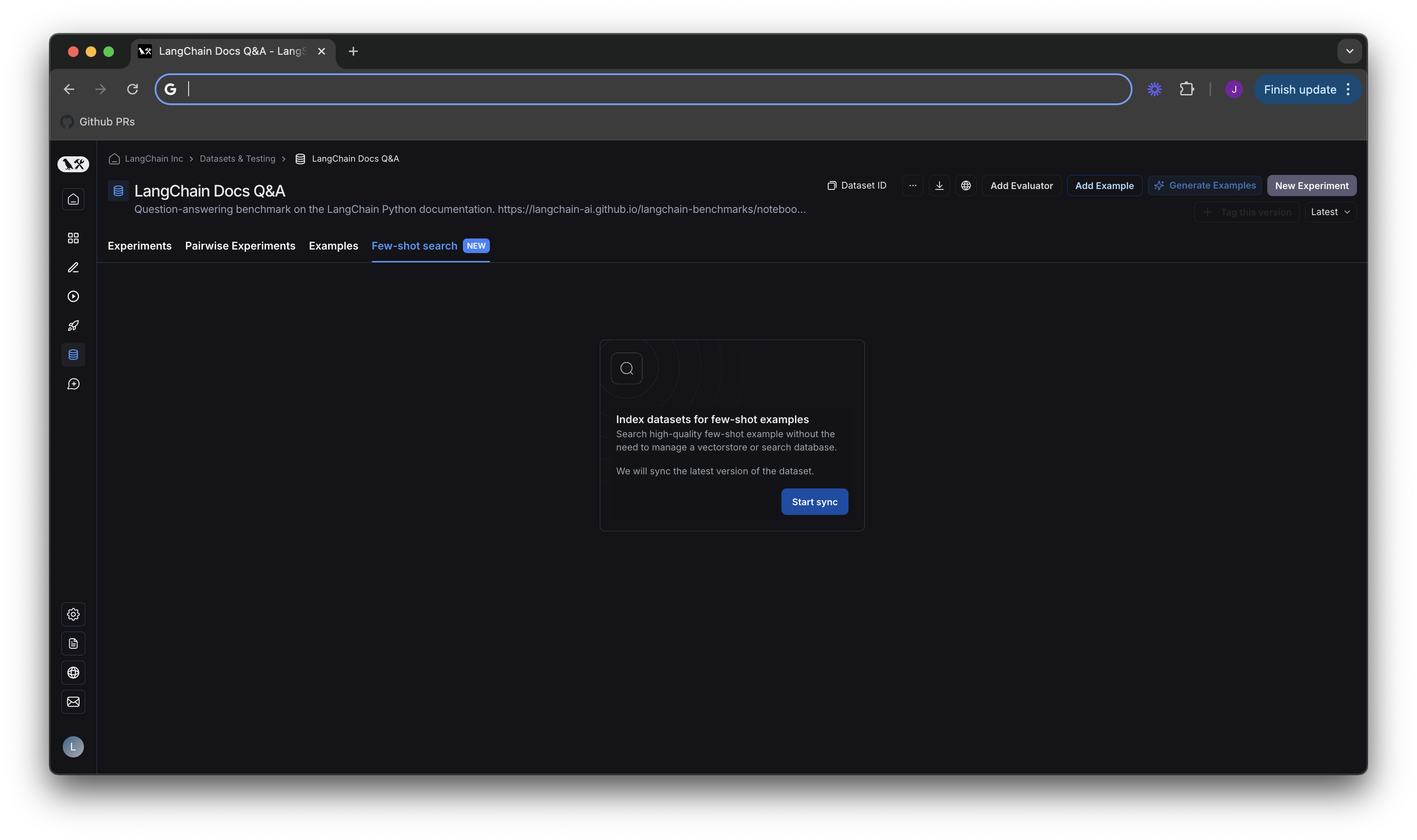 By default, we sync to the latest version of your dataset. That means when new examples are added to your dataset, they will automatically be added to your index. This process runs every few minutes, so there should be a very short delay for indexing new examples. You can see whether your index is up to date under `Few-shot index` on the lefthand side of the screen in the next section.
## Test search quality in the few shot playground
Now that you have turned on indexing for your dataset, you will see the new few shot playground.
By default, we sync to the latest version of your dataset. That means when new examples are added to your dataset, they will automatically be added to your index. This process runs every few minutes, so there should be a very short delay for indexing new examples. You can see whether your index is up to date under `Few-shot index` on the lefthand side of the screen in the next section.
## Test search quality in the few shot playground
Now that you have turned on indexing for your dataset, you will see the new few shot playground.
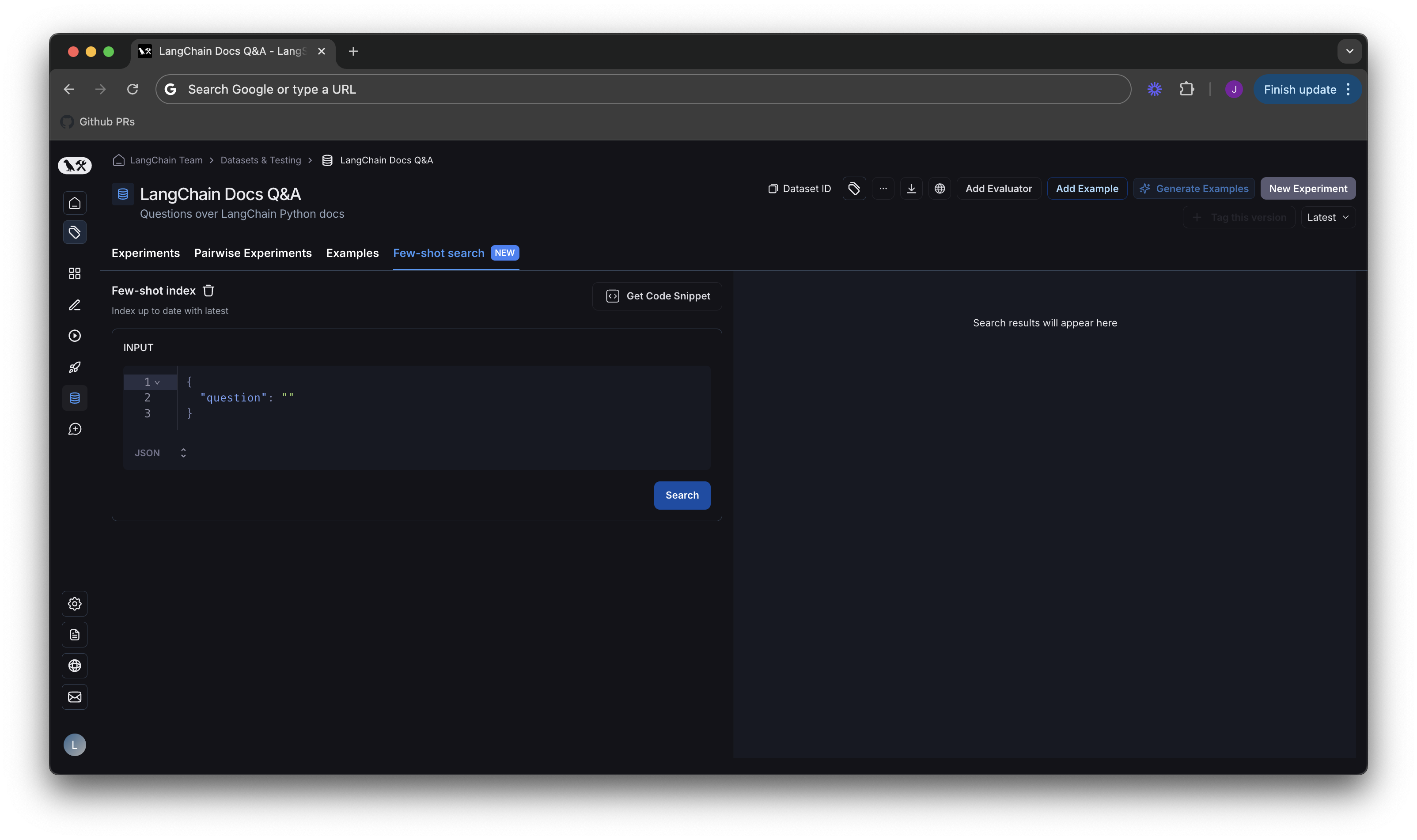 You can type in a sample input, and check which results would be returned by our search API.
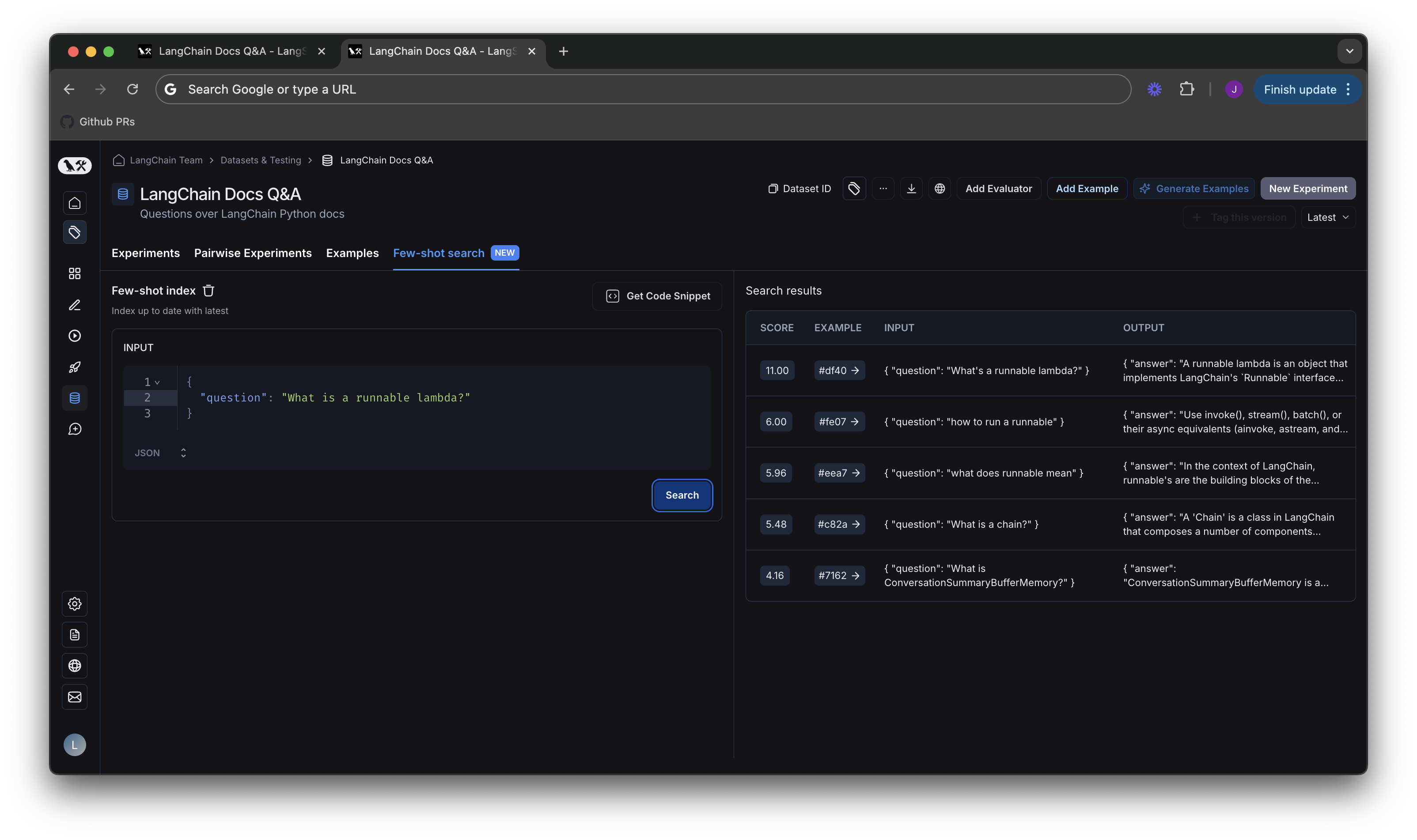 Each result will have a score and a link to the example in the dataset. The scoring system works such that 0 is a completely random result, and higher scores are better. Results will be sorted in descending order according to score.
Search uses a BM25-like algorithm for keyword based similarity scores. The actual score is subject to change as we improve the search algorithm, so we recommend not relying on the scores themselves, as their meaning may evolve over time. They are simply used for convenience in vibe-testing outputs in the playground.
## Adding few shot search to your application
Click the `Get Code Snippet` button in the previous diagram, you'll be taken to a screen that has code snippets from our LangSmith SDK in different languages.
Each result will have a score and a link to the example in the dataset. The scoring system works such that 0 is a completely random result, and higher scores are better. Results will be sorted in descending order according to score.
Search uses a BM25-like algorithm for keyword based similarity scores. The actual score is subject to change as we improve the search algorithm, so we recommend not relying on the scores themselves, as their meaning may evolve over time. They are simply used for convenience in vibe-testing outputs in the playground.
## Adding few shot search to your application
Click the `Get Code Snippet` button in the previous diagram, you'll be taken to a screen that has code snippets from our LangSmith SDK in different languages.
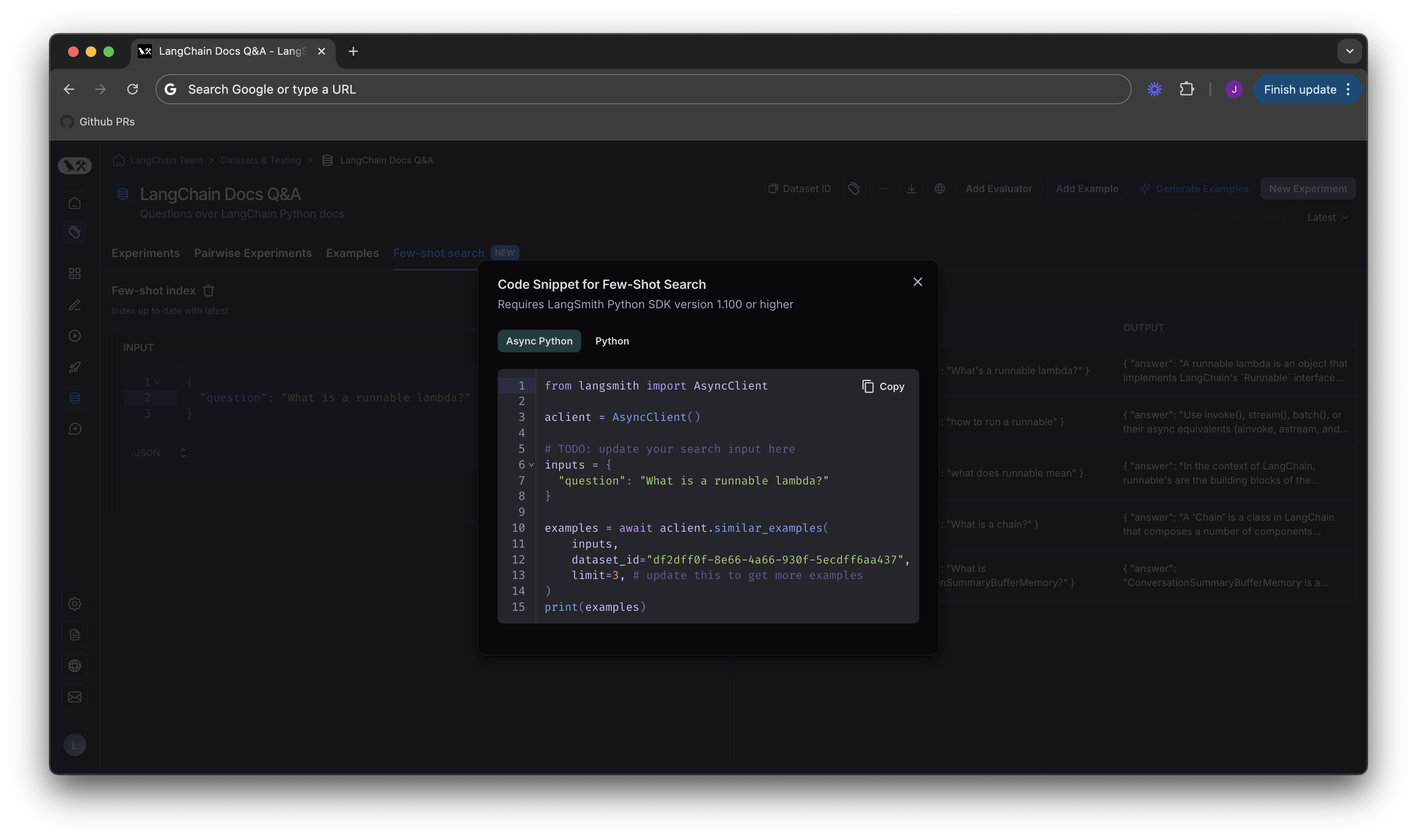 For code samples on using few shot search in LangChain python applications, please see our [how-to guide in the LangChain docs](https://python.langchain.com/v0.2/docs/how_to/example_selectors_langsmith/).
### Code snippets
Please ensure you are using the python SDK with version >= 1.101 or the typescript SDK with version >= 1.43
For copy and paste convenience, you can find the similar code snippets to the ones shown in the screenshot above here:
```python Python (Async) theme={null}
import langsmith as ls
# Copy this value from LangSmith UI
dataset_id = "1c5e9c95-dfd4-4dc5-a4b8-df7ea921c913"
async with ls.AsyncClient() as client:
examples = await client.similar_examples(
{"question": "knock knock"}, dataset_id=dataset_id, limit=1
)
print(examples[0].outputs) # {"output": "Few shots'll do the trick."}
```
```python Python theme={null}
from langsmith import Client
client = Client()
# Copy this value from LangSmith UI
dataset_id = "1c5e9c95-dfd4-4dc5-a4b8-df7ea921c913"
examples = client.similar_examples(
{"question": "knock knock"}, dataset_id=dataset_id, limit=1
)
print(examples[0].outputs)
# {"output": "Few shots'll do the trick."}
```
```typescript TypeScript theme={null}
import { Client } from "langsmith";
const client = new Client();
// Copy this value from LangSmith UI
const dataset_id = "1c5e9c95-dfd4-4dc5-a4b8-df7ea921c913";
const examples = await client.similarExamples({question: "knock knock"}, dataset_id, 1);
console.log(examples[0].outputs);
// {output: "Few shots'll do the trick."}
```
***
[Edit the source of this page on GitHub.](https://github.com/langchain-ai/docs/edit/main/src/langsmith/index-datasets-for-dynamic-few-shot-example-selection.mdx)
[Connect these docs programmatically](/use-these-docs) to Claude, VSCode, and more via MCP for real-time answers.
For code samples on using few shot search in LangChain python applications, please see our [how-to guide in the LangChain docs](https://python.langchain.com/v0.2/docs/how_to/example_selectors_langsmith/).
### Code snippets
Please ensure you are using the python SDK with version >= 1.101 or the typescript SDK with version >= 1.43
For copy and paste convenience, you can find the similar code snippets to the ones shown in the screenshot above here:
```python Python (Async) theme={null}
import langsmith as ls
# Copy this value from LangSmith UI
dataset_id = "1c5e9c95-dfd4-4dc5-a4b8-df7ea921c913"
async with ls.AsyncClient() as client:
examples = await client.similar_examples(
{"question": "knock knock"}, dataset_id=dataset_id, limit=1
)
print(examples[0].outputs) # {"output": "Few shots'll do the trick."}
```
```python Python theme={null}
from langsmith import Client
client = Client()
# Copy this value from LangSmith UI
dataset_id = "1c5e9c95-dfd4-4dc5-a4b8-df7ea921c913"
examples = client.similar_examples(
{"question": "knock knock"}, dataset_id=dataset_id, limit=1
)
print(examples[0].outputs)
# {"output": "Few shots'll do the trick."}
```
```typescript TypeScript theme={null}
import { Client } from "langsmith";
const client = new Client();
// Copy this value from LangSmith UI
const dataset_id = "1c5e9c95-dfd4-4dc5-a4b8-df7ea921c913";
const examples = await client.similarExamples({question: "knock knock"}, dataset_id, 1);
console.log(examples[0].outputs);
// {output: "Few shots'll do the trick."}
```
***
[Edit the source of this page on GitHub.](https://github.com/langchain-ai/docs/edit/main/src/langsmith/index-datasets-for-dynamic-few-shot-example-selection.mdx)
[Connect these docs programmatically](/use-these-docs) to Claude, VSCode, and more via MCP for real-time answers.