> ## Documentation Index
> Fetch the complete documentation index at: https://langchain-5e9cc07a-preview-javaex-1765204202-a1f8093.mintlify.site/llms.txt
> Use this file to discover all available pages before exploring further.
# Configure PagerDuty integration for LangSmith alerts
## Overview
This guide walks through the process of configuring PagerDuty as a notification channel for [LangSmith alerts](/langsmith/alerts) using PagerDuty's [Events API v2](https://developer.pagerduty.com/docs/events-api-v2-overview). This integration allows critical LLM application issues to trigger PagerDuty incidents, enabling rapid response through your established incident management workflow.
## Prerequisites
* An active PagerDuty account with administrator access
* Appropriate service-level permissions in PagerDuty
Additionally, if on a custom deployment of LangSmith, make sure there are no firewall settings blocking egress traffic from LangSmith services.
## Integration Steps
### Step 1: Create a Service in PagerDuty
1. Log in to your PagerDuty account
2. Navigate to **Services → Service Directory**
3. Click **+ New Service**
4. Complete the following fields:
* **Name**: Provide a descriptive name (e.g., "LangSmith Monitoring")
* **Description**: Add details about the monitored application
* **Escalation Policy**: Select the appropriate team escalation policy
* **Integration Type**: Select "Events API V2"
5. Click **Add Service** to create the service
### Step 2: Obtain Integration Key
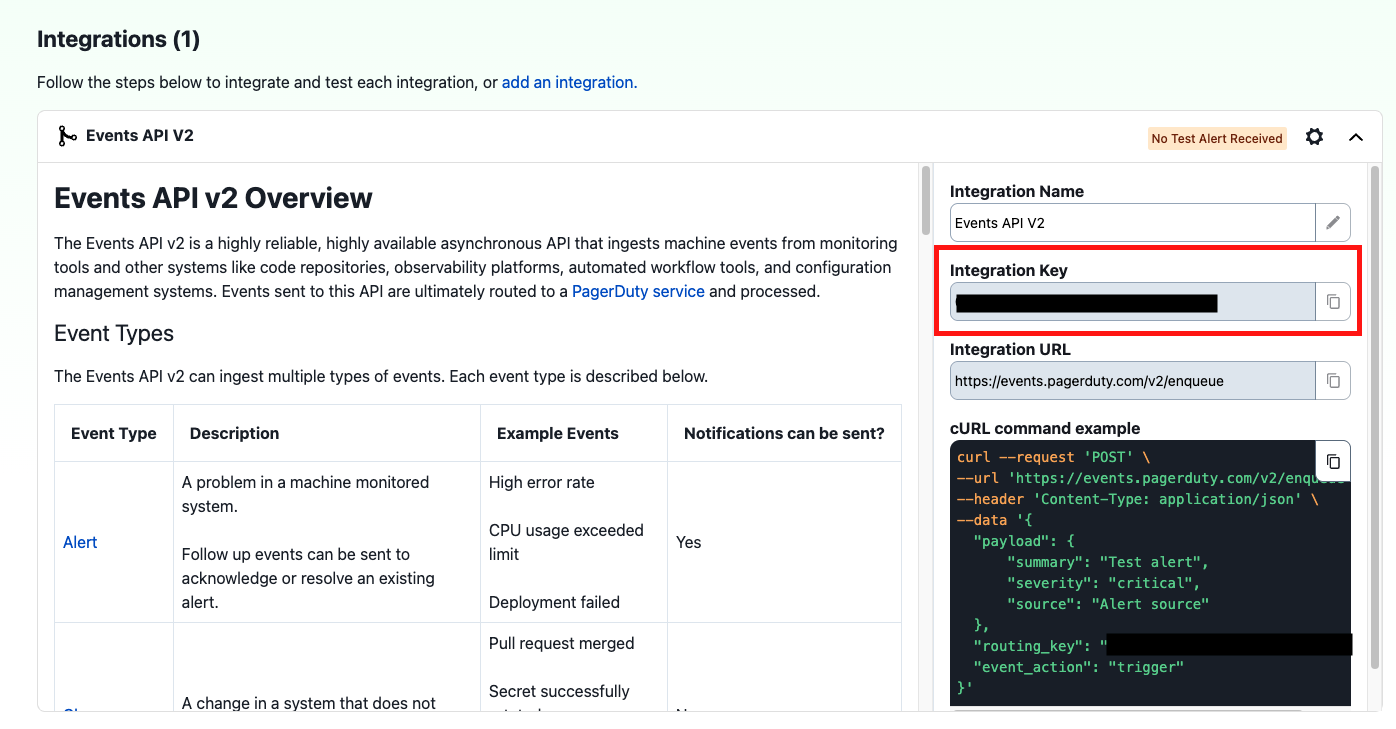
After creating the service, you'll need to retrieve the Integration Key:
1. From the **Service Directory** under the Service dropdown, locate and click on your newly created service
2. Select the **Integrations** tab
3. Find the "Events API V2" integration
4. Copy the **Integration Key** (a 32-character alphanumeric string)
 ### Step 3: Configure LangSmith Alert with PagerDuty
To receive the same alert again within an hour of it being triggered, you must resolve the active incident created by the alert in PagerDuty.
### Step 3: Configure LangSmith Alert with PagerDuty
To receive the same alert again within an hour of it being triggered, you must resolve the active incident created by the alert in PagerDuty.
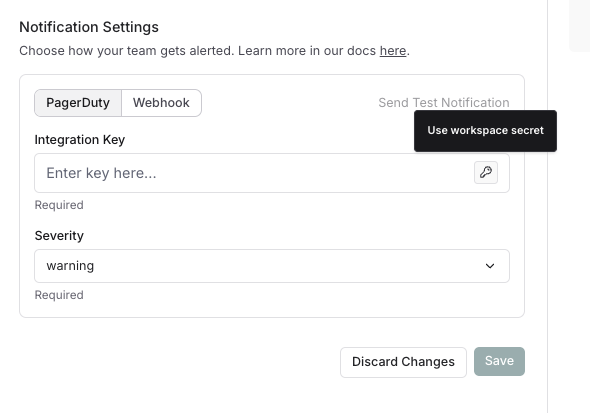 1. In the notification section of your alert set-up in LangSmith, select **PagerDuty**
2. Click the key icon to save the Integration Key as a Workspace secret or select an existing Workspace secret. As a best practice, we recommend saving the Integration Key as a Workspace Secret rather than adding it directy. This will allow you to re-use the same key across alerts for a workspace.
3. Configure additional notification options:
* **Severity**: Maps to PagerDuty incident priority
4. Send a test alert by clicking **Send Test Alert**
5. Verify the incident is triggered by PagerDuty and contains relevant LangSmith alert information
## Troubleshooting
If incidents aren't being created in PagerDuty:
* Verify the Integration Key is entered correctly in LangSmith
* Ensure the PagerDuty service is active and not in maintenance mode
* Check that your PagerDuty account has Events API v2 enabled
* If an alert trigger appears to be missing in PagerDuty, check whether the expected trigger occurred within one hour of a previous trigger from the same alert rule, and whether the incident created by the previous alert is still open.
* Review network connectivity if your LangSmith instance is behind a firewall
## Additional Resources
* [PagerDuty Events API v2 Documentation](https://developer.pagerduty.com/docs/events-api-v2/overview/)
* [PagerDuty Integration Guide](https://support.pagerduty.com/docs/services-and-integrations)
* [LangSmith Alerts Documentation](/langsmith/alerts)
***
[Edit the source of this page on GitHub.](https://github.com/langchain-ai/docs/edit/main/src/langsmith/alerts-pagerduty.mdx)
[Connect these docs programmatically](/use-these-docs) to Claude, VSCode, and more via MCP for real-time answers.
1. In the notification section of your alert set-up in LangSmith, select **PagerDuty**
2. Click the key icon to save the Integration Key as a Workspace secret or select an existing Workspace secret. As a best practice, we recommend saving the Integration Key as a Workspace Secret rather than adding it directy. This will allow you to re-use the same key across alerts for a workspace.
3. Configure additional notification options:
* **Severity**: Maps to PagerDuty incident priority
4. Send a test alert by clicking **Send Test Alert**
5. Verify the incident is triggered by PagerDuty and contains relevant LangSmith alert information
## Troubleshooting
If incidents aren't being created in PagerDuty:
* Verify the Integration Key is entered correctly in LangSmith
* Ensure the PagerDuty service is active and not in maintenance mode
* Check that your PagerDuty account has Events API v2 enabled
* If an alert trigger appears to be missing in PagerDuty, check whether the expected trigger occurred within one hour of a previous trigger from the same alert rule, and whether the incident created by the previous alert is still open.
* Review network connectivity if your LangSmith instance is behind a firewall
## Additional Resources
* [PagerDuty Events API v2 Documentation](https://developer.pagerduty.com/docs/events-api-v2/overview/)
* [PagerDuty Integration Guide](https://support.pagerduty.com/docs/services-and-integrations)
* [LangSmith Alerts Documentation](/langsmith/alerts)
***
[Edit the source of this page on GitHub.](https://github.com/langchain-ai/docs/edit/main/src/langsmith/alerts-pagerduty.mdx)
[Connect these docs programmatically](/use-these-docs) to Claude, VSCode, and more via MCP for real-time answers.